A new wave of ransomware attacks targeting Synology Network Attached Storage (NAS) devices highlights the growing security risks associated with outdated storage systems and unpatched vulnerabilities.
Synology has issued an urgent security warning after identifying attackers exploiting a previously patched vulnerability in its DiskStation Manager (DSM) operating system.
The attacks are associated with reports of C3RB3R ransomware, which encrypts files stored on compromised NAS devices and demands payment for their recovery.
According to Synology’s October 29, 2026 security announcement, the attackers are targeting devices running outdated DSM software by exploiting a vulnerability addressed in December 2024.
For businesses relying on NAS infrastructure for centralized file storage, backups, surveillance recordings, and business-critical applications, these attacks demonstrate why storage security must be a core component of enterprise cybersecurity.
What Is Happening? Synology NAS Devices Under Ransomware Attack
Synology NAS systems are widely deployed across small businesses, enterprises, and IT environments to provide centralized storage, file sharing, backup repositories, and data protection.
However, these devices can become attractive targets when they are exposed to the internet, inadequately secured, or running outdated software.
Recent reports indicate that attackers are compromising vulnerable Synology NAS devices and deploying ransomware designed to encrypt stored information.
Affected users have reported:
- Files becoming inaccessible after encryption.
- Encrypted files receiving the
.L0CK3Dextension. - Ransom notes appearing on compromised storage devices.
- Attackers demanding payment for specialized decryption software.
- Potential disruption to backup and file-sharing operations.
The reported ransomware family is known as C3RB3R, also associated with the CerberImposter name.
Although the ransomware campaign has been reported publicly, Synology has not confirmed which individual vulnerability is being exploited.
Critical Synology DSM Vulnerabilities
The attacks have renewed attention on vulnerabilities documented in Synology security advisory Synology-SA-24:20.
The advisory covers three vulnerabilities affecting DSM components.
| Vulnerability | CVSS | Potential impact |
|---|---|---|
| CVE-2024-10441 | 9.8 Critical | Remote code execution |
| CVE-2024-50629 | 5.3 Medium | Unauthorized reading of limited files |
| CVE-2024-10445 | 4.3 Medium | Unauthorized writing of limited files |
CVE-2024-10441: Critical Remote Code Execution
This vulnerability affects the system plugin daemon in Synology DSM.
It involves improper encoding or escaping of output and could potentially allow remote attackers to execute arbitrary code through unspecified attack vectors.
With a CVSS score of 9.8, it represents a critical security risk.
Successful exploitation of remote code execution vulnerabilities can potentially allow attackers to deploy malicious software, manipulate systems, and compromise stored information.
Important: Although this vulnerability is a potential candidate, Synology has not publicly confirmed that CVE-2024-10441 is the specific vulnerability used in the current C3RB3R attacks.
CVE-2024-50629: Unauthorized File Access
This vulnerability affects the DSM web API component.
Successful exploitation could allow remote attackers to read limited files, potentially exposing sensitive information depending on the affected system’s configuration.
CVE-2024-10445: Unauthorized File Modification
This vulnerability involves improper certificate validation in DSM’s update functionality.
It could allow remote attackers to write limited files under certain conditions.
While its severity is lower than the remote code execution vulnerability, unauthorized file modification remains a significant security concern.
How the Synology NAS Ransomware Attack Works
The following infographic illustrates a potential six-stage attack chain associated with C3RB3R ransomware targeting vulnerable Synology NAS devices. It highlights how attackers may identify outdated DSM installations, exploit security weaknesses, deploy ransomware, encrypt stored files, and disrupt business operations. The diagram also outlines key security controls organizations can implement to reduce their exposure. The exact exploitation sequence has not been independently confirmed.
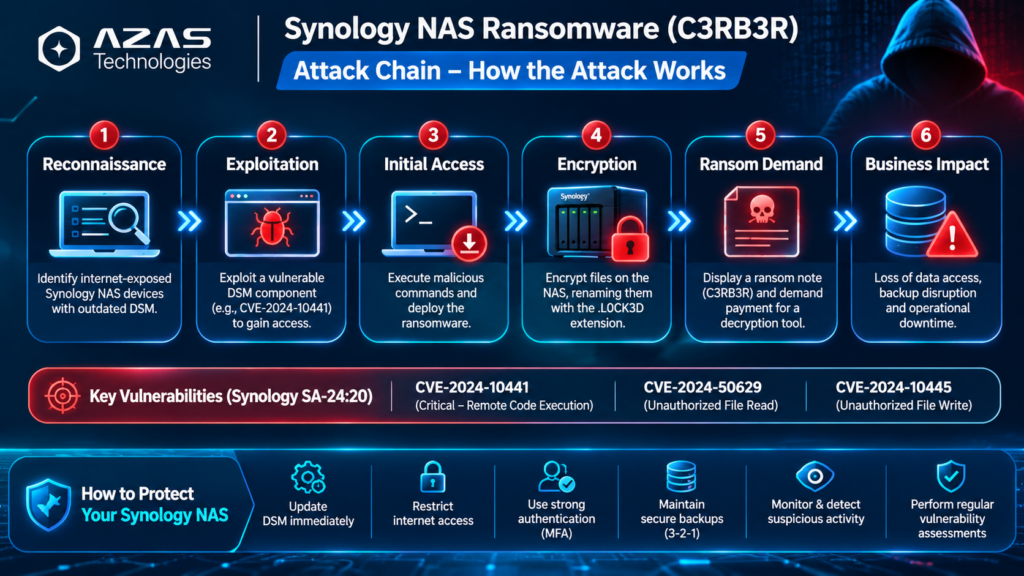
The following illustrates a potential attack progression based on the reported campaign and common ransomware behavior. It should not be interpreted as a fully verified forensic reconstruction of the C3RB3R campaign.
Stage 1: Identification of vulnerable NAS devices
Attackers identify accessible Synology NAS systems that may be running outdated DSM versions.
Internet-exposed management interfaces can increase the likelihood of discovery and exploitation.
Stage 2: Exploitation of an unpatched vulnerability
Attackers attempt to exploit a vulnerable DSM component to gain unauthorized access or execute malicious operations.
The exact vulnerability exploited in the reported campaign remains unconfirmed.
Stage 3: Deployment of ransomware
Following successful compromise, attackers deploy malicious ransomware components to the affected storage environment.
Stage 4: Encryption of stored data
The ransomware encrypts accessible files, making important business information unavailable.
Reports of this campaign describe encrypted files carrying the .L0CK3D extension.
Stage 5: Ransom demand
Victims discover ransom notes instructing them to purchase decryption software.
Payment does not guarantee successful recovery.
Stage 6: Business disruption
Compromised NAS infrastructure can interrupt file sharing, backup operations, application access, and other services that depend on the affected storage.
Which Synology DSM Versions Require Updates?
Synology has published fixed releases addressing the vulnerabilities referenced in its security advisory.
| DSM version | Minimum fixed release |
|---|---|
| DSM 7.2.2 | 7.2.2-72806-1 |
| DSM 7.2.1 | 7.2.1-69057-6 |
| DSM 7.2 | 7.2-64570-4 |
| DSM 7.1 | 7.1.1-42962-7 |
| DSM 6.2 | 6.2.4-25556-8 |
These are the minimum releases associated with the referenced 2024 advisory, not necessarily the latest available DSM versions.
Organizations should install the latest applicable vendor-supported release, including subsequent security fixes.
Devices that cannot run a supported DSM release should be isolated and considered for replacement.
Why NAS Ransomware Is a Serious Threat to Businesses
NAS devices often contain large volumes of valuable organizational information.
Unlike ordinary workstations, a single compromised NAS device may affect multiple departments or business services simultaneously.
1. Centralized data exposure
NAS infrastructure commonly stores shared documents, financial records, project files, and other sensitive business information.
A successful ransomware attack can disrupt access to these resources.
2. Backup infrastructure compromise
Many organizations use NAS devices as backup repositories.
If ransomware compromises the NAS or reaches accessible backup data, organizations may lose important recovery options.
3. Operational downtime
Encrypted storage can interrupt business applications, file-sharing services, and other dependent systems.
4. Financial and reputational impact
Ransomware incidents may result in operational losses, recovery expenses, investigation costs, and customer concerns.
5. Increased risk from unmanaged infrastructure
Storage devices are sometimes excluded from routine vulnerability assessments, patch-management programs, and security monitoring.
This creates opportunities for attackers to exploit vulnerabilities that already have publicly available fixes.
How to Protect Synology NAS Devices Against Ransomware
Organizations should implement multiple security controls rather than relying on software updates alone.
1. Update Synology DSM immediately
Review the DSM version installed on every Synology NAS device.
Navigate to:
DSM → Control Panel → Update & Restore
Check for available updates and install the latest supported security release after reviewing compatibility and backup requirements.
Where appropriate, enable automatic security updates.
2. Restrict internet exposure
Avoid exposing DSM management interfaces directly to the public internet.
Recommended controls include:
- Remove unnecessary port-forwarding rules.
- Restrict management access through firewall policies.
- Use secure VPN connectivity for remote administration.
- Disable unused services and remote-access features.
- Limit administrative access to trusted networks.
3. Strengthen authentication
Use strong, unique administrator credentials and enable multifactor authentication where supported.
Disable the default administrator account where appropriate and review privileged accounts regularly.
4. Implement ransomware-resistant backups
Follow the 3-2-1 backup principle and maintain at least one offline or appropriately immutable backup copy.
Backup repositories should have restricted permissions and independent credentials.
Regular restoration testing is essential to verify that backups remain usable.
5. Monitor NAS infrastructure continuously
Implement centralized monitoring to identify operational and security anomalies.
Useful monitoring indicators include:
- NAS availability and connectivity.
- CPU, memory, and storage utilization.
- Disk and RAID health.
- Unusual network traffic.
- Repeated authentication failures.
- Backup failures and unexpected storage consumption.
- Unexpected changes to critical services.
Solutions such as Paessler PRTG Network Monitor can provide infrastructure availability and performance monitoring, while centralized security logging, SIEM, and supported endpoint protection technologies can provide additional security visibility.
Infrastructure monitoring alone does not guarantee ransomware detection.
6. Conduct regular vulnerability assessments
Perform periodic vulnerability assessments covering NAS devices, storage management interfaces, operating systems, and exposed services.
Security teams should prioritize critical vulnerabilities, especially those associated with remote code execution.
7. Segment storage infrastructure
Place NAS management interfaces and sensitive storage systems in appropriately secured network segments.
Restrict access using firewalls, VLANs, and least-privilege policies.
This can reduce unnecessary exposure and limit the potential impact of a compromised system.
What Should You Do If Your Synology NAS Is Already Infected?
If ransomware infection is suspected, immediate containment is essential.
Step 1: Isolate the affected NAS
Disconnect compromised devices from untrusted network connectivity and suspend affected synchronization or backup operations.
Step 2: Preserve evidence
Retain ransomware notes, suspicious files, system logs, and other relevant forensic evidence.
Avoid unnecessarily resetting or formatting the device.
Step 3: Investigate the compromise
Determine the likely entry point, identify affected accounts, and assess whether additional systems or backup repositories were impacted.
Step 4: Remediate security weaknesses
Remove unauthorized access, apply security updates, review exposed services, and reset potentially compromised credentials using a trusted device.
Step 5: Restore from verified backups
Recover data only after the affected environment has been secured.
Use verified clean backups and validate restored information before resuming normal operations.
Important: Updating DSM helps address known vulnerabilities but does not decrypt files already encrypted by ransomware.
What This Means for Organizations in the UAE
Businesses across the UAE increasingly depend on network-attached storage for document management, centralized backups, surveillance recordings, and operational data.
The Synology ransomware campaign highlights an important cybersecurity challenge: even vulnerabilities patched years earlier can remain dangerous when systems are not maintained.
Organizations should treat NAS devices as critical IT assets and include them in their security governance programs.
This means maintaining accurate asset inventories, applying security updates, restricting remote access, monitoring system health, and ensuring that recovery procedures are regularly tested.
A proactive approach can significantly reduce the likelihood and impact of storage-related cyber incidents.
How AZAS Technologies Can Help Secure Your Storage Infrastructure
At AZAS Technologies, we help organizations across the UAE strengthen their cybersecurity posture and improve the visibility, availability, and resilience of critical IT infrastructure.
Our services include:
- Vulnerability Assessment & Penetration Testing (VAPT): Identify vulnerabilities, insecure configurations, and exposed services across enterprise infrastructure.
- Network & Infrastructure Monitoring: Monitor NAS availability, storage health, network performance, and critical infrastructure using solutions such as PRTG.
- Cybersecurity Solutions: Implement layered security controls, including next-generation firewalls, endpoint protection, and secure network access.
- Security Hardening & Risk Assessment: Review storage infrastructure configurations, administrative access, network segmentation, and patch-management practices.
- Security Advisory & Remediation Support: Help organizations prioritize security weaknesses and implement appropriate mitigation measures.
Protect Your Business Before Ransomware Strikes
Outdated storage infrastructure should never become the weak point in your organization’s cybersecurity strategy.
Contact AZAS Technologies to discuss vulnerability assessments, NAS security hardening, infrastructure monitoring, and cybersecurity solutions tailored to your business.
Website: https://azastechnologies.com
Contact Us: https://azastechnologies.com/contact-us/
Frequently Asked Questions
What is C3RB3R ransomware?
C3RB3R is a ransomware family associated with attacks that encrypt victims’ files and demand payment for decryption. Recent reports have linked it to attacks targeting outdated Synology NAS devices.
Which Synology NAS devices are vulnerable?
The current campaign targets devices running vulnerable or outdated DSM software. Exposure depends on the installed software version, applicable security patches, and device configuration.
Is CVE-2024-10441 being actively exploited?
The vulnerability is included in the Synology advisory associated with the campaign, but Synology has not confirmed which specific CVE is being exploited in these attacks.
Can antivirus software prevent NAS ransomware?
Antivirus and endpoint protection can provide useful security layers, but they should be combined with patch management, network restrictions, access controls, security monitoring, and protected backups.
Can encrypted Synology NAS files be recovered?
Recovery may be possible using verified clean backups or other legitimate recovery methods. Availability depends on the ransomware variant, the extent of damage, and the organization’s backup arrangements.
How can businesses reduce NAS ransomware risks?
Organizations should update DSM, restrict public access, strengthen authentication, implement resilient backups, monitor infrastructure, and conduct regular security assessments.
Conclusion
The latest Synology NAS ransomware attacks demonstrate that unpatched vulnerabilities remain a major cybersecurity threat even after security fixes have been available for an extended period.
The reported C3RB3R campaign reinforces the importance of maintaining storage infrastructure, reducing unnecessary internet exposure, and implementing layered cybersecurity controls.
For organizations relying on NAS systems to support business operations, proactive patch management, security monitoring, and reliable backup strategies are essential.
AZAS Technologies helps businesses across the UAE build secure, resilient, and continuously monitored IT environments.
Secure Your Infrastructure. Protect Your Data. Strengthen Your Cyber Resilience.