In today’s digital business environment, uninterrupted IT operations are essential. From network switches and firewalls to servers, storage systems, applications, and cloud services, organizations depend on complex IT infrastructure to deliver reliable services.
But how can IT teams identify network outages, performance degradation, or hardware failures before they affect business operations?
This is where Paessler PRTG Network Monitor plays an important role.
PRTG provides centralized visibility into IT infrastructure, helping organizations monitor availability, performance, bandwidth utilization, and system health through a unified monitoring platform.
In this article, we explain how PRTG works, the technologies behind its monitoring capabilities, and how organizations can use it to improve IT operations.
What Is Paessler PRTG Network Monitor?
Paessler PRTG is an IT infrastructure monitoring solution designed to continuously monitor networks, servers, applications, storage systems, and other connected devices.
Instead of manually checking individual devices, IT administrators can use PRTG to monitor infrastructure health from a centralized dashboard.
PRTG can help organizations:
- Monitor network and server availability.
- Track CPU, memory, disk, and bandwidth utilization.
- Detect network performance degradation.
- Monitor firewall, router, and switch interfaces.
- Receive notifications when monitored services fail.
- Analyze historical performance and capacity trends.
- Generate availability and performance reports.
The result is improved operational visibility and faster identification of potential infrastructure problems.
How Does PRTG Network Monitoring Work?
PRTG uses a sensor-based architecture to collect performance and availability information from IT devices.
The monitoring process consists of five main stages.
1. Device Discovery
PRTG can automatically discover devices connected to a defined network segment.
Through its auto-discovery functionality, PRTG identifies reachable devices and can create appropriate monitoring sensors based on supported technologies and device templates.
For example, it may discover routers, switches, servers, printers, and other network-connected equipment.
2. Sensor-Based Monitoring
Sensors are the foundation of PRTG monitoring.
A sensor monitors a specific aspect of a device or service.
For example, a network switch may have separate sensors for:
- Device availability
- CPU utilization
- Memory usage
- Interface bandwidth
- Port status
- Hardware temperature
Each sensor collects measurements using a supported monitoring technology.
Some sensors also provide multiple channels, allowing several related measurements to be displayed together.
3. Data Collection
PRTG collects monitoring information through several protocols and interfaces.
These include:
SNMP (Simple Network Management Protocol)
Used extensively for monitoring routers, switches, firewalls, UPS devices, and other network equipment.
SNMP enables PRTG to retrieve information such as interface traffic, CPU load, memory utilization, device uptime, and hardware status.
WMI (Windows Management Instrumentation)
Used for monitoring Windows servers and systems.
PRTG can retrieve operating system performance information, including CPU usage, memory consumption, disk utilization, and Windows-related metrics.
SSH (Secure Shell)
Used for monitoring Linux and Unix-based systems through supported commands and sensors.
Flow Technologies
NetFlow, sFlow, jFlow, and IPFIX can provide visibility into network traffic patterns, including traffic sources, destinations, and bandwidth consumers.
HTTP, HTTPS, and APIs
Used to monitor websites, application endpoints, and systems exposing supported interfaces.
Custom scripts and API-based sensors can extend monitoring to systems that do not have a suitable built-in sensor.
4. Threshold Monitoring and Alerts
Once data is collected, PRTG evaluates sensor status and configured limits.
For example, an organization may configure:
- A warning when CPU utilization exceeds 80%.
- A critical alert when CPU utilization exceeds 95%.
- An alert when a network interface becomes unavailable.
- A warning when storage capacity falls below a defined threshold.
When a configured notification trigger is met, PRTG can notify administrators through email, push notifications, or other supported notification methods.
These alerts help IT teams investigate problems before they escalate into major service disruptions.
5. Dashboards and Reporting
PRTG consolidates monitoring information into dashboards, graphs, and reports.
IT administrators can visualize:
- Overall infrastructure health
- Available and unavailable devices
- Bandwidth utilization
- Server resource consumption
- Network latency and packet loss
- Historical performance trends
- Service availability
Custom dashboards can also be created for Network Operations Centers (NOCs), IT management teams, and infrastructure support engineers.
What Can PRTG Monitor?
PRTG supports monitoring across multiple areas of IT infrastructure.
Network Infrastructure Monitoring
PRTG can monitor routers, switches, firewalls, wireless infrastructure, and network connectivity.
Common metrics include interface availability, traffic utilization, packet loss, latency, CPU usage, and memory consumption.
This helps administrators identify congested links, unstable devices, and network outages.
Server Monitoring
PRTG supports monitoring of Windows and Linux servers.
Depending on the operating system and sensor technology, administrators can monitor CPU utilization, memory consumption, disk capacity, network traffic, and service availability.
This allows IT teams to identify resource constraints and potential server failures.
Storage Monitoring
Enterprise storage platforms play a critical role in application availability.
PRTG can monitor supported storage systems using SNMP, APIs, or custom sensors.
Depending on the storage platform, monitoring can include:
- Storage capacity
- Disk and controller health
- Hardware temperature
- Storage port availability
- I/O performance metrics
- Hardware component status
This is particularly useful for organizations operating centralized storage and virtualization environments.
Application and Service Monitoring
PRTG can monitor the availability and performance of business-critical applications and services.
Examples include web services, databases, DNS, email services, and supported application endpoints.
This helps IT teams detect service interruptions and performance issues affecting end users.
Bandwidth and Traffic Monitoring
PRTG provides visibility into bandwidth utilization across network interfaces.
With supported flow technologies, organizations can gain additional insight into traffic sources, destinations, protocols, and bandwidth consumption patterns.
This information helps with network troubleshooting and capacity planning.
Understanding PRTG Architecture: Core Server, Probes, and Sensors
PRTG Network Monitor uses three important components.
PRTG Core Server
The core server manages the monitoring configuration, stores monitoring data, processes notifications, and provides the web interface.
PRTG Probes
Probes collect monitoring information from devices and services.
A local probe runs alongside the core server, while remote probes can be deployed to monitor geographically distributed sites or separate network segments.
PRTG Sensors
Sensors perform individual monitoring tasks and report measurements and status information through their associated probes.
For example, a company with multiple offices can deploy remote probes at branch locations while maintaining centralized monitoring through its PRTG core server.
This architecture supports distributed monitoring across complex enterprise environments.
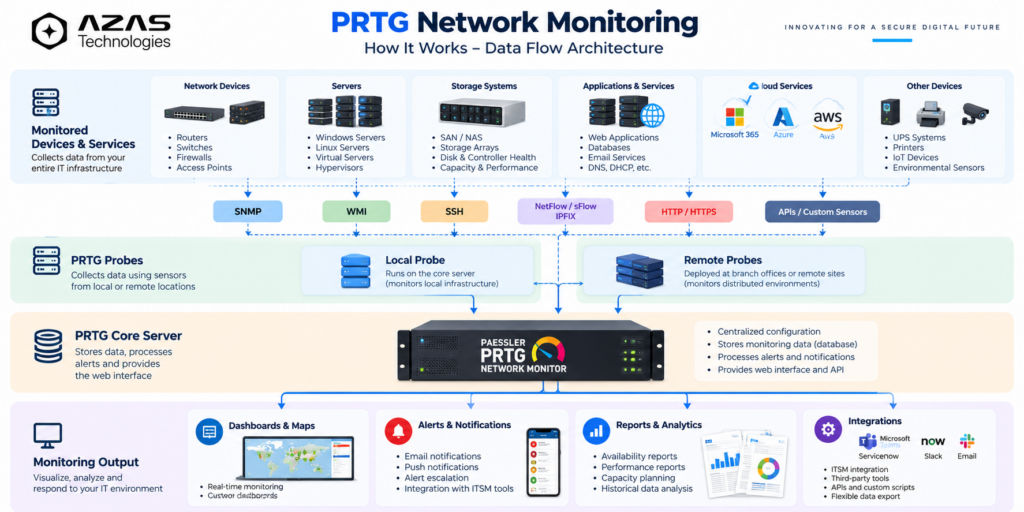
How PRTG monitoring works — Technical Overview
This diagram illustrates the data flow described in the article, from monitored devices through probes to the PRTG core server.
How PRTG Helps Network Operations Centers (NOCs)
A Network Operations Center requires continuous visibility into infrastructure availability and performance.
PRTG can support NOC operations through centralized dashboards and automated alerts.
A well-designed NOC dashboard may display:
- Overall network availability
- Critical device failures
- WAN connectivity status
- Server and storage health
- Bandwidth utilization
- Active alerts and warnings
Large-screen monitoring dashboards allow operations teams to identify critical issues quickly and prioritize incident response.
PRTG’s historical reporting capabilities also support infrastructure performance reviews and capacity planning.
PRTG Monitoring in Multi-Site Environments
Organizations operating multiple offices, branches, or data centers often face challenges in maintaining centralized visibility.
PRTG remote probes enable monitoring across distributed network locations.
For example, a UAE-based organization operating offices in Dubai, Abu Dhabi, and Sharjah could deploy remote probes at appropriate locations and consolidate monitoring information into a central PRTG installation.
This approach can help IT teams monitor branch connectivity, network devices, servers, and other infrastructure without requiring separate monitoring dashboards for every location.
Remote probe deployment and connectivity should be designed around network security, firewall rules, and infrastructure requirements.
Key Business Benefits of PRTG Monitoring
1. Improved Infrastructure Visibility
Centralized dashboards reduce the need to manually inspect multiple management platforms.
2. Faster Incident Detection
Continuous monitoring and configurable alerts help teams detect failures and performance degradation.
3. Reduced Operational Disruption
Early warning indicators can support preventive maintenance and faster troubleshooting.
4. Better Capacity Planning
Historical trends help organizations understand resource utilization and plan infrastructure upgrades.
5. Improved IT Operational Efficiency
Automated monitoring reduces repetitive manual checks and supports more efficient infrastructure management.
6. Centralized Multi-Site Monitoring
Remote probes help consolidate monitoring across distributed IT environments.
Best Practices for Implementing PRTG
Organizations planning a PRTG deployment should consider several important practices.
- Identify business-critical infrastructure before configuring sensors.
- Select appropriate monitoring technologies for each device type.
- Prefer SNMPv3 where supported and practical.
- Configure meaningful warning and critical thresholds.
- Establish notification escalation procedures.
- Use remote probes where network segmentation or geographical distribution requires them.
- Review sensor counts, polling intervals, and system performance.
- Build dashboards tailored to operational and management requirements.
- Regularly review monitoring coverage and reporting requirements.
An effective monitoring deployment requires more than installing software. Proper sensor selection, alert configuration, dashboard design, and ongoing optimization are essential.
How AZAS Technologies Can Help
At AZAS Technologies, we understand the importance of maintaining visibility and operational control across business-critical IT infrastructure.
We help organizations plan and implement centralized infrastructure monitoring solutions aligned with their operational requirements.
Our monitoring-related services can include:
- PRTG deployment and configuration
- Network device and server monitoring
- Storage and infrastructure health monitoring
- Custom sensor development and API integrations
- NOC dashboard design and customization
- Alerting and notification configuration
- Performance reporting and monitoring optimization
- Ongoing monitoring support
Whether an organization operates a single office, multiple branches, or a complex enterprise infrastructure, a properly designed monitoring solution can improve operational awareness and support faster incident response.
Frequently Asked Questions About PRTG
What is a sensor in PRTG?
A sensor is a monitoring component that measures a specific aspect of a device or service, such as CPU usage, interface traffic, or availability.
Does PRTG support SNMP monitoring?
Yes. PRTG supports SNMP-based monitoring of compatible network devices, including routers, switches, firewalls, and other infrastructure equipment.
Can PRTG monitor multiple locations?
Yes. PRTG supports remote probes, allowing organizations to monitor infrastructure across multiple sites from a central installation.
Can PRTG monitor storage systems?
Yes. PRTG can monitor supported storage platforms using built-in sensors, SNMP, APIs, or custom integrations, depending on the device capabilities.
Does PRTG provide real-time dashboards?
PRTG provides dashboards showing current sensor states and recently collected monitoring information. Update frequency depends on the sensor type and configured polling intervals.
Can PRTG integrate with other monitoring platforms?
PRTG provides APIs and custom sensor capabilities that can support integrations with external tools and reporting platforms, subject to compatibility and configuration.
Conclusion
As IT environments become more complex, centralized infrastructure monitoring is increasingly important for maintaining service availability and operational efficiency.
Paessler PRTG Network Monitor provides a flexible, sensor-based approach to monitoring network infrastructure, servers, applications, storage, and distributed IT environments.
By combining continuous monitoring, automated notifications, dashboards, and historical reporting, organizations can improve infrastructure visibility and make more informed operational decisions.
Looking to improve your IT infrastructure monitoring?
Contact AZAS Technologies to discuss PRTG implementation, customized monitoring dashboards, and infrastructure monitoring solutions tailored to your business.
For organizations reviewing their network monitoring requirements, explore AZAS Technologies: Network Monitoring to learn more about network visibility, performance monitoring, infrastructure reliability, and proactive issue detection.
AZAS Technologies — Innovating for a Secure Digital Future.